- If you already have an account, choose Store > Sign Out.
- Pick your country by clicking on the country flag located in the bottom right corner of the main iTunes Store page.
- If your country also has an iTunes Store, you'll need to navigate to the App Store by clicking on App Store from the top navigation bar. If not, proceed to step 4.
- Important: Before proceeding to the next step, you must purchase a free application by clicking Free App.
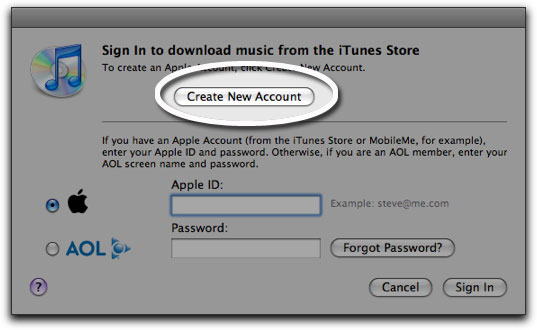
- Click create new account.
- Click Continue.
- You'll need to read and agree to the iTunes Store Terms & Conditions. Make sure you check the box next to where it says "I have read and agree to the iTunes Terms and Conditions."
- Click Continue.
- Enter your email address, create your password, continue to create and answer your security question, then enter your birthday. Click Continue.
- Select None as the payment option.
- Continue to fill out the required name and address fields.
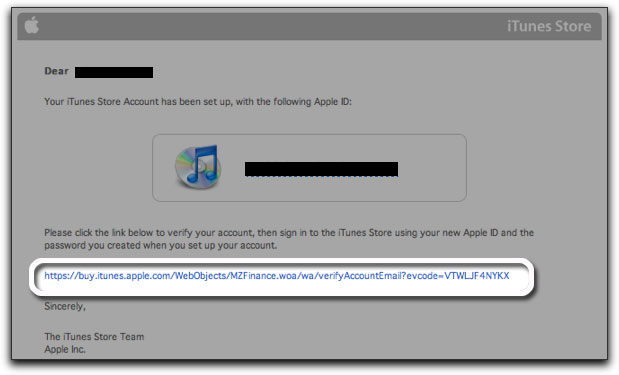
- You'll then see a screen that says 'Verify your Account'. Click Done and then check your email for a verification email from iTunes Store.
- Open the email and click the link enclosed in the email to activate your account.
- Once you click on the link, iTunes should then prompt you to sign in with your account name and password.
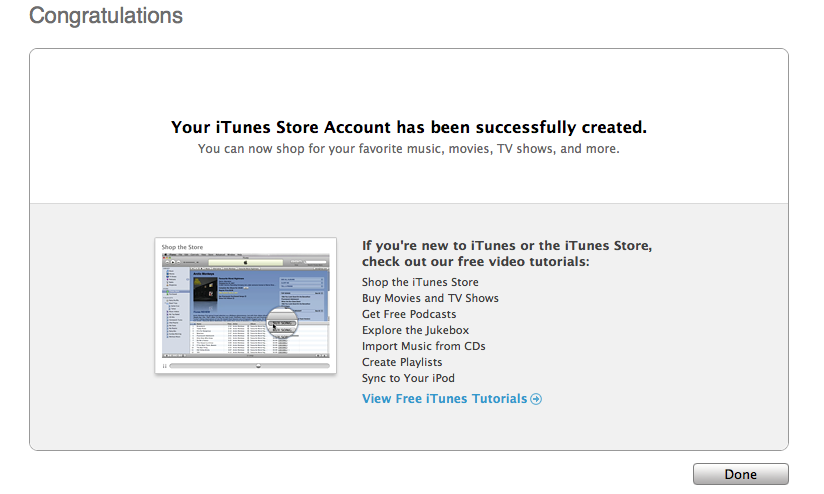
- You'll then see the below "Congratulations" screen. Click Done to be taken to the App Store home page.
03 November 2010
Create an iTunes App Store account without a credit card (Free)
To create an iTunes App Store account without a credit card please follow the steps below. In order to create an account without a credit card, you must make sure you are in the App Store, not the iTunes Store.




18 October 2010
Total Training Adobe Photoshop CS5 Extended Advance


Total Training Adobe Photoshop CS5 Extended Advanced DVD
http://hotfile.com/dl/76615201/f7bc043/T2APCSEA-iNKiSO.part1.rar.html
http://hotfile.com/dl/76615202/046d9d2/T2APCSEA-iNKiSO.part2.rar.html
http://hotfile.com/dl/76615203/39f3bbf/T2APCSEA-iNKiSO.part3.rar.html
http://hotfile.com/dl/76615205/349c47d/T2APCSEA-iNKiSO.part4.rar.html
http://hotfile.com/dl/76615204/cf4164b/T2APCSEA-iNKiSO.part5.rar.html
15 October 2010
Update Your iPhone 4 IOS4.1 Without Upgrading Your Baseband Using TinyUmbrella

Follow this tutorial if you would like to update your iPhone 4 firmware without upgrading your baseband by using TinyUmbrella! It is important that you read the TinyUmbrella readme file before you do anything else. The readme file is located here. Remember this tutorial is only for Window users a Mac version of this tutorial will be available soon.
Note: This tutorial only works with iPhone 4.
Let’s begin!
Download listing:
Download Tiny Umbrella for Windows
Download iPhone 4 4.1 firmware
1. Download the TinyUmbrella for Window and iPhone 4 4.1 firmware from our download listings.

2. Right click on the downloaded TinyUmbrella.exe file (umbrella-4.1.6.exe) and select Run as Administrator the the popup menu.

3. Alot of you might have Windows security enabled, if this alert comes up make sure both boxes are checked and click on Allow access.

4. Please make sure your device is connected so that TinyUmbrella can detect your device and the firmware.

5. Make sure Cydia or TinyUmbrella has an SHSH of the latest firmware. You can do this by simply clicking Save my SHSH.
Now click on Start TSS sever and ensure that you receive no errors.

Once The TSS Server is “running” successfully, umbrella will kill iTunes. Leave TinyUmbrella Open.

If you receive an error saying DO NOT CONTINUE. Then your restore will not work until the TSS server can not be started.

6. Now open iTunes and hold Shift and then click on Restore.

7. Navigate to the location and select the iPhone 4.1 firmware file you have just downloaded at the beginning of this tutorial from our download listings.

Click Restore to restore your iPhone

8. iTunes will give you an error (1004). And this what we wanted as this explains that our baseband has not been updated.

9. Now go back to Tiny Umbrella and click on “Kick Device Out of Recovery” as shown in the screenshot. If you have some issues by following this step then close TinyUmbrella and re-open it and do it again.

10. That’s it you are done. You have successfully updated to iOS 4.1 by preserving your phone on old baseband. You can now see that you are running your iPhone on iOS 4.1 but with old bootrom.

14 October 2010


12 October 2010
100 Handful Android Apps
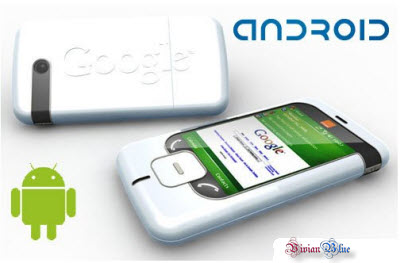
100 Handful Android Apps | 110 MB
These are a great handful of Android Apps. Many of them are paid, some are free.
App List:
Android. .3 Point.Shootout.3D.v1.0.apk
Android. .4.Players.Reactor.v1.01.apk
Android. .Abduction!.World.Attack.v1.2.6.apk
Android. .Age.Of.Conquest. .Europe.v1.0.12.apk
Android. .AG.Kranten.v2.0.apk
Android. .aHome.v3.1.0.apk
Android. .Akinator.v2.apk
Android. .Album.Art.Grabber.v1.1.5.apk
Android. .Android.Mate.v1.0.6.apk
Android. .AndWobble.v1.9.apk
Android. .Autostarts.v1.5.3.apk
Android. .Beautiful.Widgets.v2.9.apk
Android. .BetterCut.v2.0.apk
Android. .Better.Keyboard.v5.6.1.apk
Android. .Better.Terminal.Pro.v3.05.apk
Android. .Blapk.Market.v1.0.8.apk
Android. .Bonsai.Blast.v1.4.apk
Android. .CacheMate.v2.5.6 .apk
Android. .Camera.Zoom.FX.v2.4.0.apk
Android. .Car.Locator.v2.80.apk
Android. .Chandroid.v2.0.apk
Android. .Contact2Sim.Pro.v1.1.1.apk
Android. .Contact.Sidebar.v2.2.apk
Android. .Cool.Texter.v1.9.apk
Android. .Droidbox.Pro.v2.011.apk
Android. .DroidLive.v2.0.5.apk
Android. .dxTop.Home.Alternative.v2.6.4.apk
Android. .Executive.Assistant.v1.4.3.apk
Android. .Gameboid.v1.7.7.apk
Android. .GBCoid.v1.4.7.apk
Android. .GDE.v0.3.0.3.apk
Android. .GDocs.IO.Extras.v1.0.5.apk
Android. .Gensoid.v1.8.7.apk
Android. .Grave.Defence.v1.0.0.apk
Android. .Homerun.Battle.3D.v1.2.6.apk
Android. .Hyperspace.v1.33b.apk
Android. .Image.Lock.v1.6.5.apk
Android. .i.Music.Tao.v1.2.25.apk
Android. .IM+.v2.0.4.apk
Android. .Inventory.Droid.v.2.6.apk
Android. .iPharmacy.v2.1.apk
Android. .iSyncr.v0.9.52.apk
Android. .Jewellust.v2.0.9.apk
Android. .Klaxon.v4.2.7.apk
Android. .LightUp.v1.08.apk
Android. .Locale.v1.0.7
Android. .Lock2.0.v3.7.apk
Android. .LockBot.Pro.v1.12.0.apk
Android. .Louder.Volume.Hack.v3.5.apk
Android. .Mediaserver.Full.v0.9.3.apk
Android. .Menshealth.Workouts.v1.4.apk
Android. .MLB.At.Bat.2010.v1.0.2.apk
Android. .Mobile.Package.Tracker.v1.3.8.apk
Android. .More.Icons.Widget.v2.4.apk
Android. .Moxier.Mail.v2.1.58.apk
Android. .MyBackup.Pro.v2.2.7.apk
Android. .Mystique. .Chapter.3.Obitus.v1.0.4.apk
Android. .Nesoid.v1.9.9.apk
Android. .Nintaii.v1.0.12.apk
Android. .Note.Everything.Pro.v1.20.apk
Android. .Nursing.Central.v1.29.0.apk
Android. .Open.Home.v4.5.apk
Android. .Orblive.v1.15.apk
Android. .Panda.Hero.Home
Android. .Photo.Safe.License.v1.0.0.apk
Android. .Pure.Calendar.Widget.v1.8.1.apk
Android. .Pure.Grid.Calendar.Widget.v1.3.0.apk
Android. .Pure.Messenger.Widget.v1.4.0.apk
Android. .Pure.Music.Widget.v1.0.5.apk
Android. .Radiant.v2.3.1.apk
Android. .Raging.Thunder.2.v1.0.2.apk
Android. .Remote.RDP.Enterprise.v2.9.5.apk
Android. .Remote.SMS.Full.v5.92.apk
Android. .Root.Explorer.v2.9.apk
Android. .Run.GPS.Trainer.UV.Pro.Full.v2.3.5b.apk
Android. .Scan2PDF.Mobile.v1.2.8.apk
Android. .Security.Pro.v1.8.1.apk
Android. .SetCPU.v1.5.0a.apk
Android. .Shoot.U.v1.1.5.apk
Android. .SlideIT.Keyboard.v1.2.apk
Android. .SlideScreen.Pro.v1.14.apk
Android. .SNesoid.v1.7.9.apk
Android. .Space.Physics.v1.6.6.apk
Android. .Speedx.3D.v1.0.9.apk
Android. .Startup.Auditor.v2.1.4.apk
Android. .Stroids.apk
Android. .Super.Air.Hocky.v1.0.21.apk
Android. .Tapatalk.Pro. .Forum.Client.v1.2.4.apk
Android. .TasKiller.Full.v2.6.2.apk
Android. .Trackmaster.v1.15.apk
Android. .Traffic.Cam.Viewer.v2.8.4.apk
Android. .Tube.Downloader.Plus.v1.13.apk
Android. .TVGiDS.tv.Pro.Nederland.v1.1.apk
Android. .Twidroid.Pro.v3.1.9.apk
Android. .Ultimate.Juice.v1.0.apk
Android. .Video.Safe.License.v1.0.0.apk
Android. .Weather.Widget.Donate.v.4.0.apk
Android. .WebSharing.v1.3.0.apk
Android. .WhitePages.with.Caller.ID.v3.0.5.apk
Download Links
Hotfile
Mirror
Hotfile
Mirror

05 October 2010
ALL IN ONE < all tool and all Jailbreak+firmware IOS > Download All iPhone / iPod
iPhone 1G


 iPod Touch 1G
iPod Touch 3G
iTouch 4G
iPad
iTunes
Windows 32bit
iTunes versionQuickTime version
Download URL
File sizeComments 7.3.0.547.1.6.200
iTunesSetup.exe
49,673,528The first public release with iPhone support. 7.3.1.37.2.0.240
iTunesSetup.exe
49,943,864
7.3.2.67.2.0.240
iTunesSetup.exe
50,005,304
7.4.0.267.2.0.240
iTunesSetup.exe
51,414,328The first public release with iPod touch support. 7.4.1.27.2.0.240
iTunesSetup.exe
51,418,424Just a shoddy attempt at blocking a free ringtone trick. 7.4.2.47.2.0.240
iTunes742Setup.exe
51,422,520
7.4.3.17.2.0.240
iTunes743Setup.exe
51,422,520
7.5.0.207.3.0.70
iTunes75Setup.exe
54,326,568Permitted activation wherever the iPhone was internationally sold (UK, Germany, France) 7.5.0.207.3.1.70
iTunesSetup.exe
54,330,664
7.6.0.297.4.0.91
iTunesSetup.exe
58,619,176Added Bonjour for Windows 7.6.0.297.4.1.14
iTunesSetup.exe
59,196,712
7.6.1.97.4.1.14
iTunesSetup.exe
59,163,944
7.6.2.97.4.5.67
iTunesSetup.exe
59,782,440
7.7.0.437.50.61.0
iTunesSetup.exe
63,481,128The first public release with iPhone 3G and iOS 2.0 support. 7.7.1.117.50.61.0
iTunesSetup.exe
63,530,280
8.0.0.357.55.90.70
iTunes8Setup.exe
67,822,888The first public release with iPod touch 2G support. 8.0.0.357.55.90.70
iTunes8Setup.exe
67,110,184This version was released only 2 days after the official 8.0 release, supposedly to fix blue screen errors. Also removed device icons for iPhones and iPods. 8.0.1.117.55.90.70
iTunes801Setup.exe
67,167,528
8.0.2.207.55.90.70
iTunesSetup.exe
68,756,776CoreFP library was moved from the QuickTime installer into iTunes 8.0.2.207.60.92.0
iTunesSetup.exe
69,076,264
8.1.0.517.60.92.0
iTunesSetup.exe
73,336,104Brought back device icons. 8.1.0.527.60.92.0
iTunesSetup.exe
73,332,008
8.1.1.107.60.92.0
iTunesSetup.exe
74,302,760
8.2.0.237.62.14.0
iTunesSetup.exe
77,690,152The first public release with iPhone 3GS and iOS 3.0 support. 8.2.0.237.62.14.0
iTunesSetup.exe
77,690,152
8.2.1.67.62.14.0
iTunesSetup.exe
77,976,864
9.0.0.707.64.17.73
iTunesSetup.exe
93,107,496The first public release with iPod touch 3G and iOS 3.1 support. 9.0.1.87.64.17.73
iTunesSetup.exe
93,074,728
9.0.2.257.64.17.73
iTunesSetup.exe
93,266,280
9.0.2.257.65.17.80
iTunesSetup.exe
93,234,472
9.0.3.157.65.17.80
iTunesSetup.exe
98,180,904
9.0.3.157.65.17.80
iTunesSetup.exe
98,181,416
9.1.0.797.66.71.0
iTunesSetup.exe
97,525,032The first public release with iPad support. Breaks blackra1n compatibility. 9.1.1.117.66.71.0
iTunesSetup.exe
97,543,464
9.1.1.127.66.71.0
iTunesSetup.exe
97,547,048
9.2.0.617.66.73.0
iTunesSetup.exe
96,768,824The first public release with iPhone 4 and iOS 4.0 support. Breaks Spirit compatibility. 9.2.1.47.66.73.0
iTunesSetup.exe
96,972,800
9.2.1.57.66.73.0
iTunesSetup.exe
96,962,344
10.0.0.687.67.75.0
iTunesSetup.exe
74,840,872
Windows 64bit
iTunes versionQuickTime version
Download URL
File sizeComments 7.6.0.297.4.0.91
iTunes64Setup.exe
59,094,312
7.6.0.297.4.1.14
iTunes64Setup.exe
???
7.6.1.97.4.1.14
iTunes64Setup.exe
59,645,224
7.6.2.97.4.5.67
iTunes64Setup.exe
60,368,680
7.7.0.437.50.61.0
iTunes64Setup.exe
64,049,960The first public release with iPhone 3G and iOS 2.0 support. 7.7.1.117.50.61.0
iTunes64Setup.exe
64,093,480
8.0.0.357.55.90.70
iTunes864Setup.exe
68,391,720The first public release with iPod touch 2G support. 8.0.0.357.55.90.70
iTunes864Setup.exe
67,672,360This version was released only 2 days after the official 8.0 release, supposedly to fix blue screen errors. Also removed device icons for iPhones and iPods. 8.0.1.117.55.90.70
iTunes80164Setup.exe
67,731,752
8.0.2.207.55.90.70
iTunes64Setup.exe
69,323,048CoreFP library was moved from the QuickTime installer into iTunes 8.0.2.207.60.92.0
iTunes64Setup.exe
69,641,000
8.1.0.517.60.92.0
iTunes64Setup.exe
73,855,272Brought back device icons. 8.1.0.527.60.92.0
iTunes64Setup.exe
73,852,200
8.1.1.107.60.92.0
iTunes64Setup.exe
74,820,904
8.2.0.237.62.14.0
iTunes64Setup.exe
78,721,320The first public release with iPhone 3GS and iOS 3.0 support. 8.2.0.237.62.14.0
iTunes64Setup.exe
78,715,176
8.2.1.67.62.14.0
iTunes64Setup.exe
78,999,840
9.0.0.707.64.17.73
iTunes64Setup.exe
94,196,008The first public release with iPod touch 3G and iOS 3.1 support. 9.0.1.87.64.17.73
iTunes64Setup.exe
94,164,264
9.0.2.257.64.17.73
iTunes64Setup.exe
94,316,840
9.0.2.257.65.17.80
iTunes64Setup.exe
94,333,224
9.0.3.157.65.17.80
iTunes64Setup.exe
99,237,160
9.0.3.157.65.17.80
iTunes64Setup.exe
99,239,720
9.1.0.797.66.71.0
iTunes64Setup.exe
98,400,552The first public release with iPad support. Breaks blackra1n compatibility. 9.1.1.117.66.71.0
iTunes64Setup.exe
98,431,784
9.1.1.127.66.71.0
iTunes64Setup.exe
98,435,368
9.2.0.617.66.73.0
iTunes64Setup.exe
97,512,248The first public release with iPhone 4 and iOS 4.0 support. Breaks Spirit compatibility. 9.2.1.47.66.73.0
iTunes64Setup.exe
97,710,080
9.2.1.57.66.73.0
iTunes64Setup.exe
97,713,960
10.0.0.687.67.75.0
iTunes64Setup.exe
75,743,528
PurpleRa1n
RedSn0w
ZiPhone
BootLoaders
I-Phone Custom Firmwares
IPhone 3G (s)
3G (s) 3.1.2
3.1.2-1GB Root Partition, UNACTIVATED, Cydia, Stock Boot Logos
3.1.2-1GB Root Partition, ACTIVATED, Cydia, Stock Boot Logos
IPhone 3G
3G 3.1.2
3.1.2-1GB Root Partition, UNACTIVATED, Cydia, Stock Boot Logos
3.1.2-1GB Root Partition, ACTIVATED, Cydia, Stock Boot Logos
3G 3.1 Activated:
3G 3.1 Unactivated:
3G 3.1 1GB Activated:
3G 3.1 1GB Unactivated:
IPhone 2G
2G 3.1.2
3.1.2-1GB Root Partition, UNACTIVATED, Cydia, Stock Boot Logos
3.1.2-1GB Root Partition, ACTIVATED, Cydia, Stock Boot Logos
2G 3.1 Activated Unlocked:
2G 3.1 Unactivated Unlocked:
IPod Touch (2G)
3.1.2-1GB Root Partition, Cydia, Stock Boot Logos
IPod Touch (1G)
3.1.2-1GB Root Partition, Cydia, Stock Boot Logos
ITouch 1G (Default Partition Size)


- iOS 4.1
- iOS 4.0.2
- iOS 4.0.1
- iOS 4.0
- FW 3.1.3
- FW 3.1.2
- FW 3.1
- FW 3.0.1
- FW 3.0
- FW 2.2.1
- FW 2.2
- FW 2.1
- FW 2.0.2
- FW 2.0.1
- FW 2.0


- Fw 1.1.1
- Fw 1.1.2
- Fw 1.1.3
- Fw 1.1.4
- Fw 1.1.5
- Fw 2.0.0
- Fw 2.0.1
- Fw 2.0.2
- Fw 2.1
- Fw 2.2.1
- Fw 3.0
- Fw 3.1
- Fw 3.1.2
- Fw 3.1.3
iPod Touch 3G
iTouch 4G
iPad
iTunes
Windows 32bit
iTunes versionQuickTime version
Download URL
File sizeComments 7.3.0.547.1.6.200
iTunesSetup.exe
49,673,528The first public release with iPhone support. 7.3.1.37.2.0.240
iTunesSetup.exe
49,943,864
7.3.2.67.2.0.240
iTunesSetup.exe
50,005,304
7.4.0.267.2.0.240
iTunesSetup.exe
51,414,328The first public release with iPod touch support. 7.4.1.27.2.0.240
iTunesSetup.exe
51,418,424Just a shoddy attempt at blocking a free ringtone trick. 7.4.2.47.2.0.240
iTunes742Setup.exe
51,422,520
7.4.3.17.2.0.240
iTunes743Setup.exe
51,422,520
7.5.0.207.3.0.70
iTunes75Setup.exe
54,326,568Permitted activation wherever the iPhone was internationally sold (UK, Germany, France) 7.5.0.207.3.1.70
iTunesSetup.exe
54,330,664
7.6.0.297.4.0.91
iTunesSetup.exe
58,619,176Added Bonjour for Windows 7.6.0.297.4.1.14
iTunesSetup.exe
59,196,712
7.6.1.97.4.1.14
iTunesSetup.exe
59,163,944
7.6.2.97.4.5.67
iTunesSetup.exe
59,782,440
7.7.0.437.50.61.0
iTunesSetup.exe
63,481,128The first public release with iPhone 3G and iOS 2.0 support. 7.7.1.117.50.61.0
iTunesSetup.exe
63,530,280
8.0.0.357.55.90.70
iTunes8Setup.exe
67,822,888The first public release with iPod touch 2G support. 8.0.0.357.55.90.70
iTunes8Setup.exe
67,110,184This version was released only 2 days after the official 8.0 release, supposedly to fix blue screen errors. Also removed device icons for iPhones and iPods. 8.0.1.117.55.90.70
iTunes801Setup.exe
67,167,528
8.0.2.207.55.90.70
iTunesSetup.exe
68,756,776CoreFP library was moved from the QuickTime installer into iTunes 8.0.2.207.60.92.0
iTunesSetup.exe
69,076,264
8.1.0.517.60.92.0
iTunesSetup.exe
73,336,104Brought back device icons. 8.1.0.527.60.92.0
iTunesSetup.exe
73,332,008
8.1.1.107.60.92.0
iTunesSetup.exe
74,302,760
8.2.0.237.62.14.0
iTunesSetup.exe
77,690,152The first public release with iPhone 3GS and iOS 3.0 support. 8.2.0.237.62.14.0
iTunesSetup.exe
77,690,152
8.2.1.67.62.14.0
iTunesSetup.exe
77,976,864
9.0.0.707.64.17.73
iTunesSetup.exe
93,107,496The first public release with iPod touch 3G and iOS 3.1 support. 9.0.1.87.64.17.73
iTunesSetup.exe
93,074,728
9.0.2.257.64.17.73
iTunesSetup.exe
93,266,280
9.0.2.257.65.17.80
iTunesSetup.exe
93,234,472
9.0.3.157.65.17.80
iTunesSetup.exe
98,180,904
9.0.3.157.65.17.80
iTunesSetup.exe
98,181,416
9.1.0.797.66.71.0
iTunesSetup.exe
97,525,032The first public release with iPad support. Breaks blackra1n compatibility. 9.1.1.117.66.71.0
iTunesSetup.exe
97,543,464
9.1.1.127.66.71.0
iTunesSetup.exe
97,547,048
9.2.0.617.66.73.0
iTunesSetup.exe
96,768,824The first public release with iPhone 4 and iOS 4.0 support. Breaks Spirit compatibility. 9.2.1.47.66.73.0
iTunesSetup.exe
96,972,800
9.2.1.57.66.73.0
iTunesSetup.exe
96,962,344
10.0.0.687.67.75.0
iTunesSetup.exe
74,840,872
Windows 64bit
iTunes versionQuickTime version
Download URL
File sizeComments 7.6.0.297.4.0.91
iTunes64Setup.exe
59,094,312
7.6.0.297.4.1.14
iTunes64Setup.exe
???
7.6.1.97.4.1.14
iTunes64Setup.exe
59,645,224
7.6.2.97.4.5.67
iTunes64Setup.exe
60,368,680
7.7.0.437.50.61.0
iTunes64Setup.exe
64,049,960The first public release with iPhone 3G and iOS 2.0 support. 7.7.1.117.50.61.0
iTunes64Setup.exe
64,093,480
8.0.0.357.55.90.70
iTunes864Setup.exe
68,391,720The first public release with iPod touch 2G support. 8.0.0.357.55.90.70
iTunes864Setup.exe
67,672,360This version was released only 2 days after the official 8.0 release, supposedly to fix blue screen errors. Also removed device icons for iPhones and iPods. 8.0.1.117.55.90.70
iTunes80164Setup.exe
67,731,752
8.0.2.207.55.90.70
iTunes64Setup.exe
69,323,048CoreFP library was moved from the QuickTime installer into iTunes 8.0.2.207.60.92.0
iTunes64Setup.exe
69,641,000
8.1.0.517.60.92.0
iTunes64Setup.exe
73,855,272Brought back device icons. 8.1.0.527.60.92.0
iTunes64Setup.exe
73,852,200
8.1.1.107.60.92.0
iTunes64Setup.exe
74,820,904
8.2.0.237.62.14.0
iTunes64Setup.exe
78,721,320The first public release with iPhone 3GS and iOS 3.0 support. 8.2.0.237.62.14.0
iTunes64Setup.exe
78,715,176
8.2.1.67.62.14.0
iTunes64Setup.exe
78,999,840
9.0.0.707.64.17.73
iTunes64Setup.exe
94,196,008The first public release with iPod touch 3G and iOS 3.1 support. 9.0.1.87.64.17.73
iTunes64Setup.exe
94,164,264
9.0.2.257.64.17.73
iTunes64Setup.exe
94,316,840
9.0.2.257.65.17.80
iTunes64Setup.exe
94,333,224
9.0.3.157.65.17.80
iTunes64Setup.exe
99,237,160
9.0.3.157.65.17.80
iTunes64Setup.exe
99,239,720
9.1.0.797.66.71.0
iTunes64Setup.exe
98,400,552The first public release with iPad support. Breaks blackra1n compatibility. 9.1.1.117.66.71.0
iTunes64Setup.exe
98,431,784
9.1.1.127.66.71.0
iTunes64Setup.exe
98,435,368
9.2.0.617.66.73.0
iTunes64Setup.exe
97,512,248The first public release with iPhone 4 and iOS 4.0 support. Breaks Spirit compatibility. 9.2.1.47.66.73.0
iTunes64Setup.exe
97,710,080
9.2.1.57.66.73.0
iTunes64Setup.exe
97,713,960
10.0.0.687.67.75.0
iTunes64Setup.exe
75,743,528
Jailbreak Tools
BlackRa1nPurpleRa1n
RedSn0w
- RedSn0w 0.9.3 for Mac
- RedSn0w 0.9.3 for Windows
- RedSn0w 0.8 3GS for Windows
- RedSn0w 0.8 3GS for Mac
- RedSn0w 3.0 for Windows
- RedSn0w 3.0 for Mac OS X
- QuickPWN 2.2.1 for Windows
- QuickPWN 2.2.1 for Mac OS X
- QuickPwn 2.2 for Windows
- QuickPwn 2.2 for Mac OS X
- QuickPwn 2.1 for Windows
- QuickPwn 1.1 for Mac OS X
- QuickPwn for Mac OS X
- QuickPwn Release Candidate (RC3)
- QuickPwn ‘150′ Beta Update
- GUI Version
- V1
- PwnageTool 3.1.5 for Mac OS X
- PwnageTool 3.1.4 for Mac OS X
- PwnageTool 3.1.3 for Mac OS X
- PwnageTool 3.1 for Mac OS X
- PwnageTool 3.0 for Mac OS X
- PwnageTool 2.2.1 for Mac OS X
- PwnageTool 2.2 for Mac OS X
- PwnageTool 2.1 for Mac OS X
- PwnageTool 2.0.3 for Mac OS X
- 2.0.1
- V1 (+ .NET Framework 3.5 required to run Sn0wbreeze)
ZiPhone
BootLoaders
I-Phone Custom Firmwares
IPhone 3G (s)
3G (s) 3.1.2
3.1.2-1GB Root Partition, UNACTIVATED, Cydia, Stock Boot Logos
3.1.2-1GB Root Partition, ACTIVATED, Cydia, Stock Boot Logos
IPhone 3G
3G 3.1.2
3.1.2-1GB Root Partition, UNACTIVATED, Cydia, Stock Boot Logos
3.1.2-1GB Root Partition, ACTIVATED, Cydia, Stock Boot Logos
3G 3.1 Activated:
3G 3.1 Unactivated:
3G 3.1 1GB Activated:
3G 3.1 1GB Unactivated:
IPhone 2G
2G 3.1.2
3.1.2-1GB Root Partition, UNACTIVATED, Cydia, Stock Boot Logos
3.1.2-1GB Root Partition, ACTIVATED, Cydia, Stock Boot Logos
2G 3.1 Activated Unlocked:
2G 3.1 Unactivated Unlocked:
IPod Touch (2G)
3.1.2-1GB Root Partition, Cydia, Stock Boot Logos
IPod Touch (1G)
3.1.2-1GB Root Partition, Cydia, Stock Boot Logos
ITouch 1G (Default Partition Size)
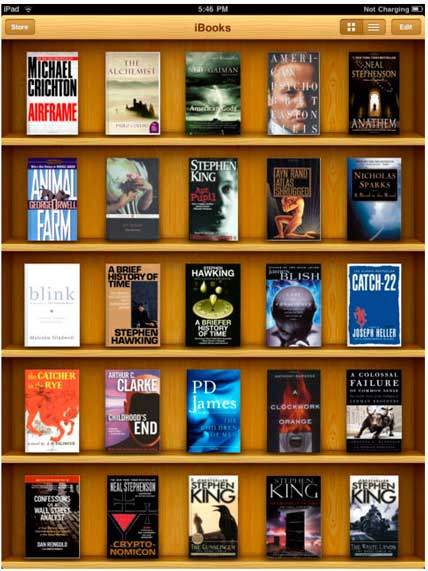
600 iPad & iPod iPhone iBooks Collection
List of iBooks
http://freetexthost.com/122mysxe1z
Download
http://hotfile.com/dl/56395875/2718993/iBooks.part1.rar.html
http://hotfile.com/dl/56395739/44ae932/iBooks.part2.rar.html
http://freetexthost.com/122mysxe1z
Download
http://hotfile.com/dl/56395875/2718993/iBooks.part1.rar.html
http://hotfile.com/dl/56395739/44ae932/iBooks.part2.rar.html
04 October 2010
iMovie 1.0 (iPhone)


Make beautiful HD movies anywhere with iMovie, the fun, feature-rich video editing app for iPhone 4. Create a video postcard of your day at the beach and publish it to the web � without ever leaving your spot in the sand. Or make a movie of your child�s birthday party and send it to your parents � while the party is in full swing. With iMovie for iPhone, you can start several projects and finish them whenever you want and wherever you are.
Made for Multi-Touch.
� Tap to add or record video right into your project.
� Drag to trim the lengths of video clips and photos.
� Pinch to zoom the timeline and get a closer look.
� Slide to scrub through the video in your project.
Give it a theme.
� Choose from a selection of themes including Modern, Bright, Travel, Playful, and News.
� Each theme includes a matching set of titles and transitions � plus its own soundtrack.
� Instantly change themes or swap themed elements in your project.
� Titles and graphics automatically update with location data from your video.
Add music and photos.
� Select from included music that matches each iMovie theme, or select from your own song library.
� Enable ducking to automatically lower the volume of background music and highlight audio from video clips.
� Add photos from your own library, or take a picture and drop it into your project.
� Customize each photo with a unique �Ken Burns� panning effect.
Share your movie.
� Export your movie in one of three sizes: Medium, Large, or HD.
� Share your movie on the web in a MobileMe gallery or on YouTube.
� Send your movie to friends and family in an email or via an MMS message.
� Easily sync your movie back to your computer.
Download link

23 September 2010


KhmerOS System File for Nokia N900
- Uploaded: 21.01.10
- Modified: 21.01.10
- File Size: 259 KB
- Downloads: 233
- version: 5.0
This font i used to display Khmer Language on Nokia N900 Maemo 5. I test and it work fine with me however do it at your own risk due to for install it, is require you gain access to root of your phone and possible to brick it if you do something else ..
NOTE : I only test on my phone not every phone ..
The Last version of ANTDictionary
It so long that all of Khmer user who love to use ANT dictionary are also waiting to get the last version of this great Khmer Dictionary and now it on this website.


Download:
1.The Last version of ANTDictionar part1
2.The Last version of ANTDictionar part2
3.The Last version of ANTDictionar part3
21 September 2010
How to Create Flower in Illustrator


http://www.mediafire.com/file/1m225vl1md3f1vv/Illustrator_Vector%20Flower%20Plant.pdf
Subscribe to:
Posts (Atom)